


TradingGuru: Trading Simulator
4.791.00 Reviews
App Specs
- Version
- 1.0.8
- Updated On
- License
- Free
- Downloads
- 500,000+
- Developer
- Crypto Guru Trading Academy and Simulator
- Categories
- Finance
- Platform
- Android
Screenshots
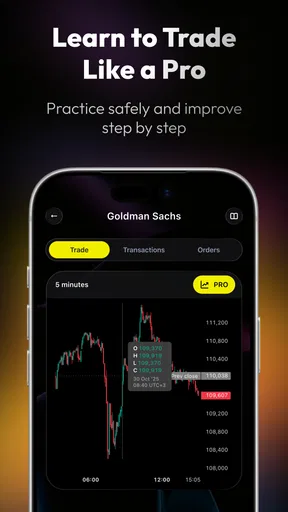
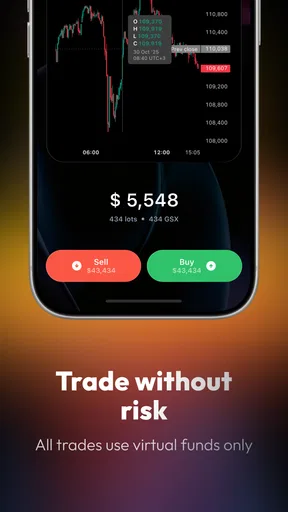
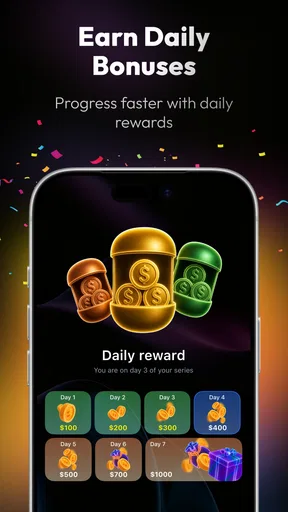
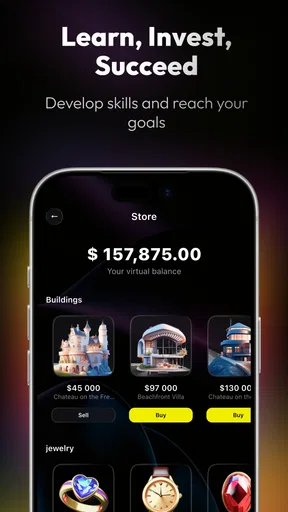
 Analysis by AppCompare
I approached TradingGuru: Trading Simulator as a learning tool rather than a shortcut to making money. That distinction matters. This is a free finance app from Crypto Guru Trading Academy and Simulator, aimed at people who want to practise stock-trading decisions without immediately putting real savings at risk. Its central promise is simple: give you a place to build a strategy, test your thinking, and become more deliberate as a trader.
My first impression was that the app makes the subject feel less intimidating than opening a live brokerage account. The store summary presents it as a way to master stock trading safely, and that safety-first angle is the most useful way to approach it. It is not a replacement for research, financial advice, or a real investment account. Instead, I see it as a practice space for learning how decisions feel when you have to choose an entry, consider a possible exit, and live with the result.
The app has attracted a 4.6 average from around four thousand ratings and has passed half a million installs, which suggests that the idea has reached a substantial audience. It is marked for mature users aged seventeen and over. That age guidance also feels appropriate: even simulated trading involves financial concepts, risk, and emotional reactions that younger users may not be ready to handle responsibly.
What the first week feels like
The strongest part of the first week is the reduction of pressure. A beginner can focus on the logic behind a trade instead of worrying about whether a mistake will affect rent, savings, or a household budget. I found that separation valuable because it encourages experimentation. You can ask yourself why you would buy, what would make you sell, and whether your original reasoning still makes sense after the market moves against you.
That makes the app more useful than simply reading a glossary of investing terms. Articles can explain concepts such as trend, timing, and risk, but they cannot recreate the uncomfortable moment when a decision you felt confident about starts looking weak. A simulator gives those ideas a practical setting. Even without real money involved, I could examine whether I was following a plan or merely reacting to movement.
For a new user, I recommend treating the opening sessions as observation exercises. Rather than trying to produce impressive results immediately, write down the reason for each decision before acting. Note what you expected to happen, what would prove the idea wrong, and how long you intended to hold the position. This turns the app from a button-pressing exercise into a basic trading journal.
One non-obvious benefit is that a simulated account can reveal your personal habits quickly. Some people discover that they enter too early because they dislike waiting. Others keep changing their plan after every movement. Someone else may avoid closing a losing position because admitting the mistake feels worse than accepting it. Those reactions are difficult to notice when reading about trading, but they become obvious when the app gives you repeated decisions to make.
Worth Reading Before You Choose

EA SPORTS FC Mobile 26 Is a Bigger Football Game, but It Takes Time

Flipboard Shows What News Apps Must Do Beyond the Feed

Switching to Android Auto Means Rethinking Your Driving Routine

Google Calendar Makes a Crowded Week Easier to Manage

Ludo King Makes the Most of the Minutes Between Plans

Baby Panda World Brings Quick Play to Modern Phones, but Its Game Library Feels Busy
A practical routine for beginners
My preferred first-week routine would be short and consistent. Spend one session learning the interface and identifying the information used for a decision. In the next session, make a small number of carefully explained trades rather than filling the account with activity. At the end of the week, review the reasons behind those choices, not just whether they ended positively.
This approach also answers an important question: can the app teach someone to trade profitably? No app should be treated as a guarantee, and this one is most valuable when it teaches process rather than promising outcomes. A good simulated result may show that a particular idea worked under those conditions. It does not prove that the same decision would work later or with real money.
I would also avoid using the simulator to practise reckless behaviour. Removing financial loss can make oversized positions and impulsive decisions feel harmless. That creates a poor habit. The better test is to behave as though the virtual balance represents money you genuinely care about. If you would not make a decision with your savings, do not use the simulation to normalise it.
Where it differs from ordinary finance apps
Compared with a standard brokerage app, TradingGuru: Trading Simulator is better suited to preparation than execution. A brokerage account is designed for placing real orders, monitoring holdings, and managing actual money. That makes it necessary for investing, but intimidating for practice. This simulator offers a lower-consequence environment, which is particularly useful for someone who has never made a trade.
Compared with a news app or market-information dashboard, its value is more behavioural. News can tell you what happened, while a simulator gives you a reason to form and test your own response. Compared with a video course, it should feel more active, although it cannot replace structured explanations or a broader education in financial statements, taxation, diversification, and personal financial planning.
The trade-off is clear. A simulator can make decision-making less frightening, but it may also make trading look cleaner than it is in real life. Real investing includes emotional pressure, changing personal circumstances, account rules, and consequences that a practice environment cannot fully reproduce. I would use this app alongside reliable educational material, not as the only source of knowledge.
Whether it remains useful after the novelty
The first month is where the app has to earn its place. The initial excitement of making pretend trades fades quickly if every session becomes the same cycle of opening the app, choosing an action, and checking the result. Its lasting value depends on whether you use it to answer specific questions about your method.
For me, the most productive monthly use would be reviewing a single strategy at a time. For example, I might spend several sessions testing whether I wait for enough evidence before entering, or whether I exit according to a rule instead of emotion. The point is not to imitate every possible market style. It is to isolate one behaviour and see how consistently I follow it.
This creates a useful month-to-month rhythm. At the start of a period, define the rule you want to practise. During the period, record the reasoning behind decisions. At the end, review the mistakes that repeated. If the same issue appears several times, the app has provided meaningful feedback even if the virtual results were mixed.
A second advanced use is separating strategy quality from discipline. Suppose a trade loses money even though you followed your written plan. That is different from losing because you abandoned the plan halfway through. The simulator is valuable when it helps you make that distinction. Without it, beginners often judge every decision only by its result and conclude that a lucky outcome was a good decision.
I would not open it every day without a purpose. Daily checking can become a form of entertainment rather than learning, especially for users who enjoy constant market movement. A scheduled review is more sustainable than compulsive monitoring. The app earns recurring value when it supports a habit of reflection, not when it demands constant attention.
How much maintenance it requires
The maintenance burden is fairly manageable for someone who uses it deliberately. You do not need to turn it into a full-time project. A short weekly review can be enough to keep the lessons fresh, while a deeper monthly review can show whether your behaviour is changing. The real work is mental: remembering why you acted and resisting the temptation to rewrite your reasoning after seeing the outcome.
That is also the app’s main limitation as a long-term tool. A simulator can provide the setting for practice, but it cannot create discipline for you. If you do not keep notes or establish a question for each session, the experience may become repetitive. The application is therefore best for users willing to bring their own structure.
I would keep a simple external record with four points: the reason for entering, the intended exit, the risk I accepted, and the lesson after closing. This workflow makes each simulated trade useful even when the interface itself does not provide a complete learning framework for your personal goals. It also prevents the common mistake of remembering only the successful decisions.
Another practical point is that the app should not become the place where you make financial decisions for your household. If you are saving for an emergency, paying down expensive debt, or trying to understand your basic budget, a budgeting app may be more appropriate. Trading practice is a later step, not a substitute for financial foundations.
Where fatigue can appear
The most likely source of fatigue is repetition without progression. Beginners may enjoy the freedom to practise at first, but that freedom can feel vague once the basic novelty disappears. If you are unsure what to test next, the app may start to feel like a collection of isolated decisions rather than a guided course.
There is also a psychological fatigue that comes from checking outcomes too often. Even simulated losses can encourage frustration, while simulated wins can create overconfidence. Both reactions can distort your judgement. I found the experience more useful when I treated results as evidence about a process, not as proof that I had discovered a winning formula.
Users who want real-time execution, detailed portfolio administration, or direct access to markets should skip this app and choose a proper brokerage service instead. Someone looking for advanced analytical tools may also prefer a dedicated market-research platform. TradingGuru is aimed at the learning gap before those tools become comfortable, not at replacing them.
It may also be a poor fit for anyone who wants passive investing guidance. If your goal is to build a diversified long-term portfolio with minimal activity, practising frequent trading may encourage exactly the behaviour you are trying to avoid. In that situation, educational material about asset allocation and long-term investing would probably serve you better.
Everyday use case: learning before taking a first real step
Imagine someone who has read about stocks during a lunch break and is considering opening a brokerage account after work. Instead of transferring money immediately, that person could use the simulator for several weeks to practise writing a reason for every decision. The useful question would not be, “Did I make virtual money?” It would be, “Can I explain my plan before I act, and can I follow it when the result is uncomfortable?”
That scenario shows the app at its best. It gives a cautious beginner a way to discover whether they actually enjoy the decision-making process. If the person becomes exhausted by reviewing trades, that is useful information before committing real funds. If the person enjoys the analysis but notices repeated impulsive choices, there is an opportunity to correct those habits while the consequences remain limited.
The app can also help a more experienced investor test a change in approach without immediately applying it to a real portfolio. That does not make the result conclusive, but it can expose obvious weaknesses in the idea. The important condition is to keep expectations modest and avoid treating simulated performance as a guarantee.
My long-term verdict
After the first-week appeal wears off, TradingGuru: Trading Simulator remains worthwhile for a specific kind of user: someone who wants repeated practice, is willing to reflect on decisions, and understands that simulation is preparation rather than proof. Its free price makes that experimentation accessible, and the focus on stock-trading practice gives it a clearer role than a general finance calculator.
The developer, Crypto Guru Trading Academy and Simulator, has positioned the product around education and simulation rather than ordinary banking. That identity is important because the app should be judged by how well it helps users form better habits. I would not judge it by whether it replaces a broker, a research terminal, or a personal finance planner. It does not need to do those jobs to be useful.
The current release is version 1.0.7 and works on Android eight and later, so compatibility should be comfortable for many older devices. I would still keep expectations realistic about longevity: the app’s continuing usefulness depends more on your workflow than on simply having it installed. Its presence on your phone is not the habit; the review process is.
My biggest recommendation is to give every session a defined purpose. Test one rule, examine one repeated mistake, or practise explaining a decision in plain language. If you do that, the simulator can become a quiet training companion that supports steady improvement. If you only chase virtual wins, its value will probably fade once the novelty disappears.
Overall, I recommend it to beginners who feel curious about trading but are not ready to risk money, and to cautious learners who want a place to rehearse decisions. I would not recommend relying on it alone, using it as financial advice, or choosing it when your real need is budgeting or passive investing. Used with restraint, its lasting strength is simple: it lets you practise the thinking behind a trade before real consequences enter the picture.
Pros
- Realistic market scenarios help users practice before risking real money.
- Useful for learning order types
- chart reading
- and basic trading decisions.
- Virtual funds make experimentation stress-free for beginners.
- Progress tracking can help users identify recurring trading mistakes.
- Suitable for short practice sessions on mobile devices.
Cons
- Simulator results may not fully reflect real-world emotions and execution delays.
- Some advanced features or lessons may require in-app purchases.
- Market data availability and accuracy can vary by region or subscription.
- The app may encourage frequent trading instead of long-term planning.
- Beginners could mistake simulated success for guaranteed real-market performance.
FAQs for TradingGuru: Trading Simulator
What is TradingGuru: Trading Simulator, and who is it designed for?
TradingGuru: Trading Simulator is an educational practice tool that lets users explore trading concepts in a simulated environment rather than placing real-money orders. It is mainly aimed at beginners who want to understand charts, market movements, order decisions, and basic risk management before using a live brokerage account. More experienced users may also find it useful for testing ideas, although simulator results should not be treated as proof of future performance.
Does TradingGuru use real money or connect to my brokerage account?
The app is intended for simulated trading, so users can practice without directly risking their own funds. Before downloading, it is still important to review the app’s permissions, account settings, and privacy policy to understand what information is collected and whether any optional integrations are available. A simulated balance is not withdrawable cash, and activity inside the app should not be confused with executing trades through a regulated broker.
Can TradingGuru: Trading Simulator help me learn real trading?
TradingGuru can provide a useful introduction to trading by allowing you to practice reading price movements, placing virtual trades, and observing how decisions affect a portfolio. However, it cannot fully reproduce the pressure, slippage, fees, liquidity limitations, and emotional challenges of live markets. Use it as a learning aid, combine it with reliable financial education, and never assume that successful virtual results guarantee real-world profits.
What features should I expect when using the simulator?
The core experience generally focuses on virtual portfolios, market-style charts, simulated buying and selling, and performance tracking. Depending on the version and platform, the available instruments, historical data, tutorials, indicators, challenges, or account features may differ. It is worth checking the latest store listing after installation, because app updates can change supported markets, data availability, interface tools, and whether certain educational or advanced features require payment.
Is TradingGuru: Trading Simulator free, and are there any risks or limitations?
You may be able to download and use the basic simulator without an upfront purchase, but some versions can include advertisements, optional subscriptions, or paid features. Check the Google Play or App Store listing for current pricing and in-app purchase details. The main limitation is educational: simulated trading may create unrealistic confidence. Avoid sharing unnecessary personal information, review permissions carefully, and remember that the app is not financial advice.


